How it works

New inquiry to booked consult,
shown screen by screen

Every screenshot below is the real product — captured unedited from the live demo workspace, a fictional law firm called Harborview Legal. Click through the same workspace yourself whenever you want.

Open the live demoNo signup — it's the exact workspace pictured below.
Step 01

Point your leads at it

Connect the places inquiries already arrive. Nothing about how customers reach you changes — LeadsApp just becomes the first pair of hands on every message.

  1. 1One form, three doors in — a hosted link, an embed snippet for your site, or a webhook from any tool
  2. 2Forward your existing inquiry inbox — mail sent to this address becomes a lead
  3. 3Or import the list you already have from a CSV
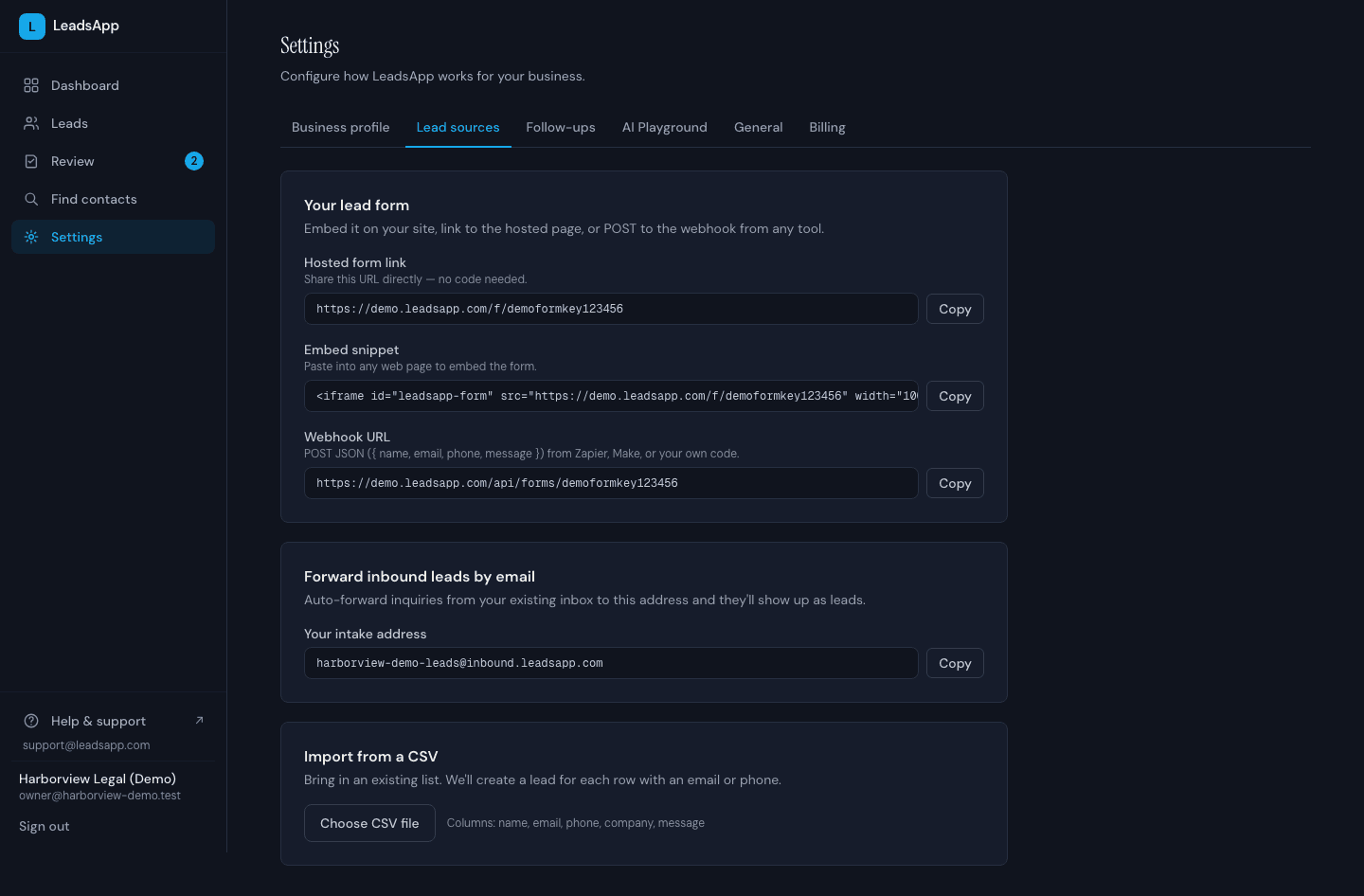
LeadsApp lead-sources settings: the hosted form link, website embed snippet, webhook URL, an email-forwarding intake address, and CSV import
Step 02

A lead writes in — it answers in under a minute

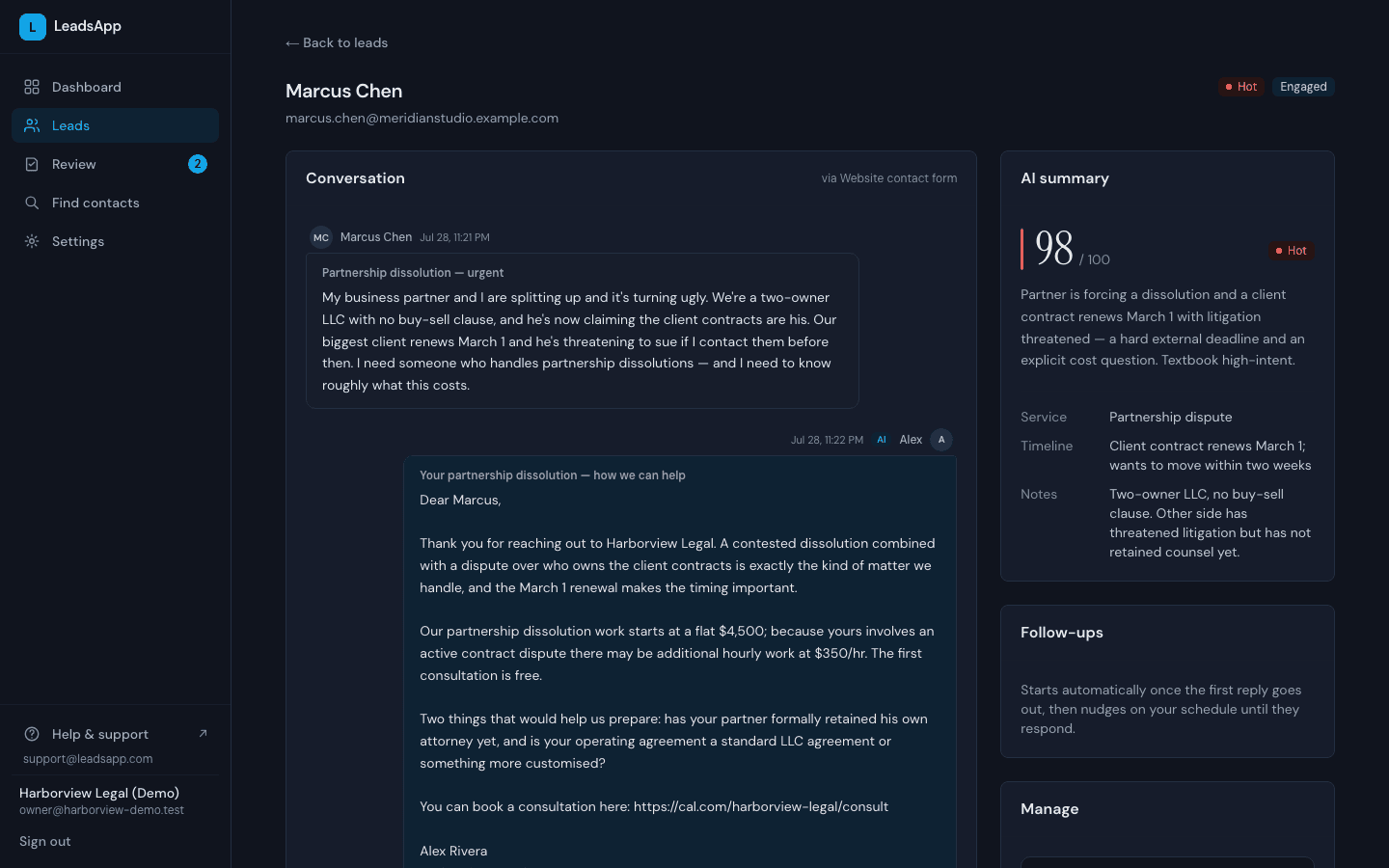
The median business takes 42 hours to reply to a new inquiry. LeadsApp writes back immediately, day or night, from your own address and in your voice — using the services, prices, and rules you set up once. It states only facts from your business profile, and it never claims availability it can't see.

  1. 1The inquiry, exactly as it arrived — 11:21 PM
  2. 2The AI's answer one minute later — the firm's real prices, pulled from its profile
  3. 3Read, scored 98/100 hot, and summarized — with the details extracted
A lead conversation in LeadsApp: an 11:21 PM inquiry about a partnership dissolution, the AI's 11:22 PM reply quoting the firm's real flat fee, and the AI summary scoring the lead 98 out of 100
Step 03

Every lead arrives qualified and scored

It asks the one or two questions you'd ask, then scores each lead 0-100 and tiers it hot, warm, or cold — with a plain-English reason you can check. Details the lead actually mentioned (matter type, budget, timeline) are pulled into fields, and throwaway email addresses are caught before they waste anyone's time.

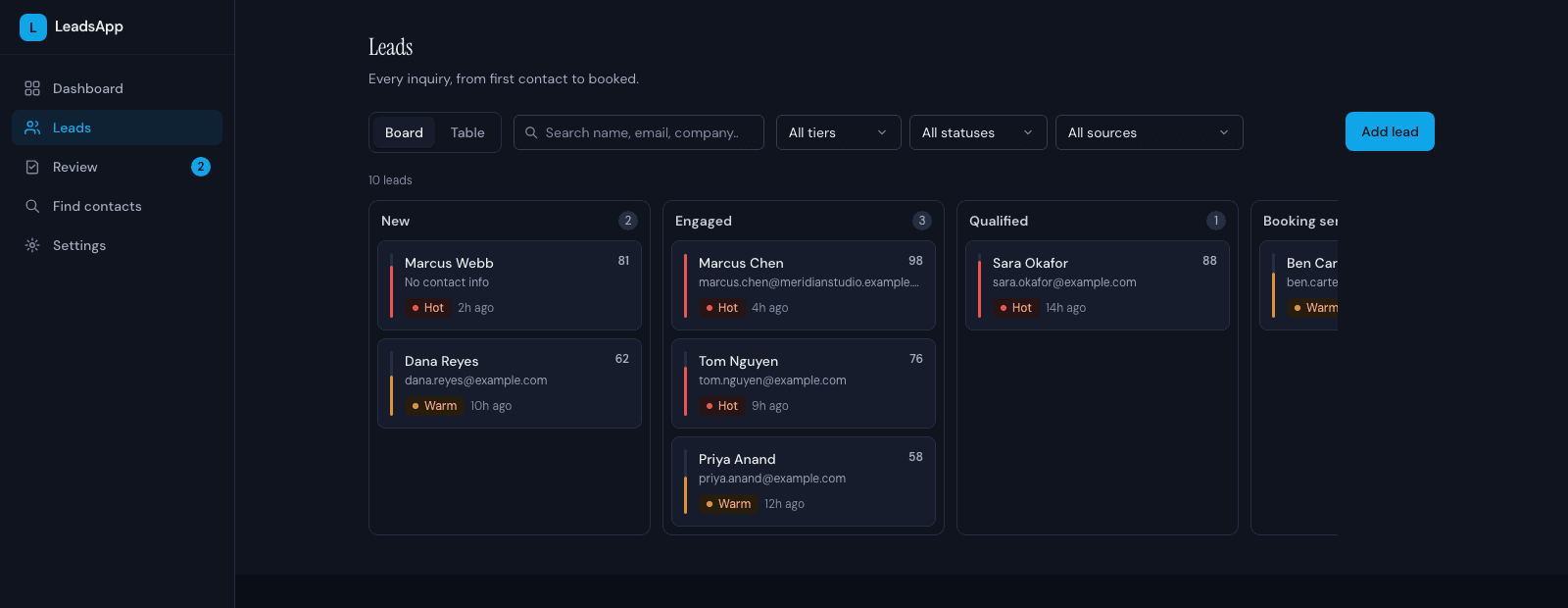
  1. 1Scored 0-100 and tiered hot, warm, or cold — the reasoning is one click away
  2. 2Status moves left to right as the AI works: new, engaged, qualified, booking sent, booked
The LeadsApp leads board: columns for new, engaged, qualified and booking-sent leads, each card carrying a 0-100 score and a hot or warm tier
Step 04

You approve every draft — until you don't want to

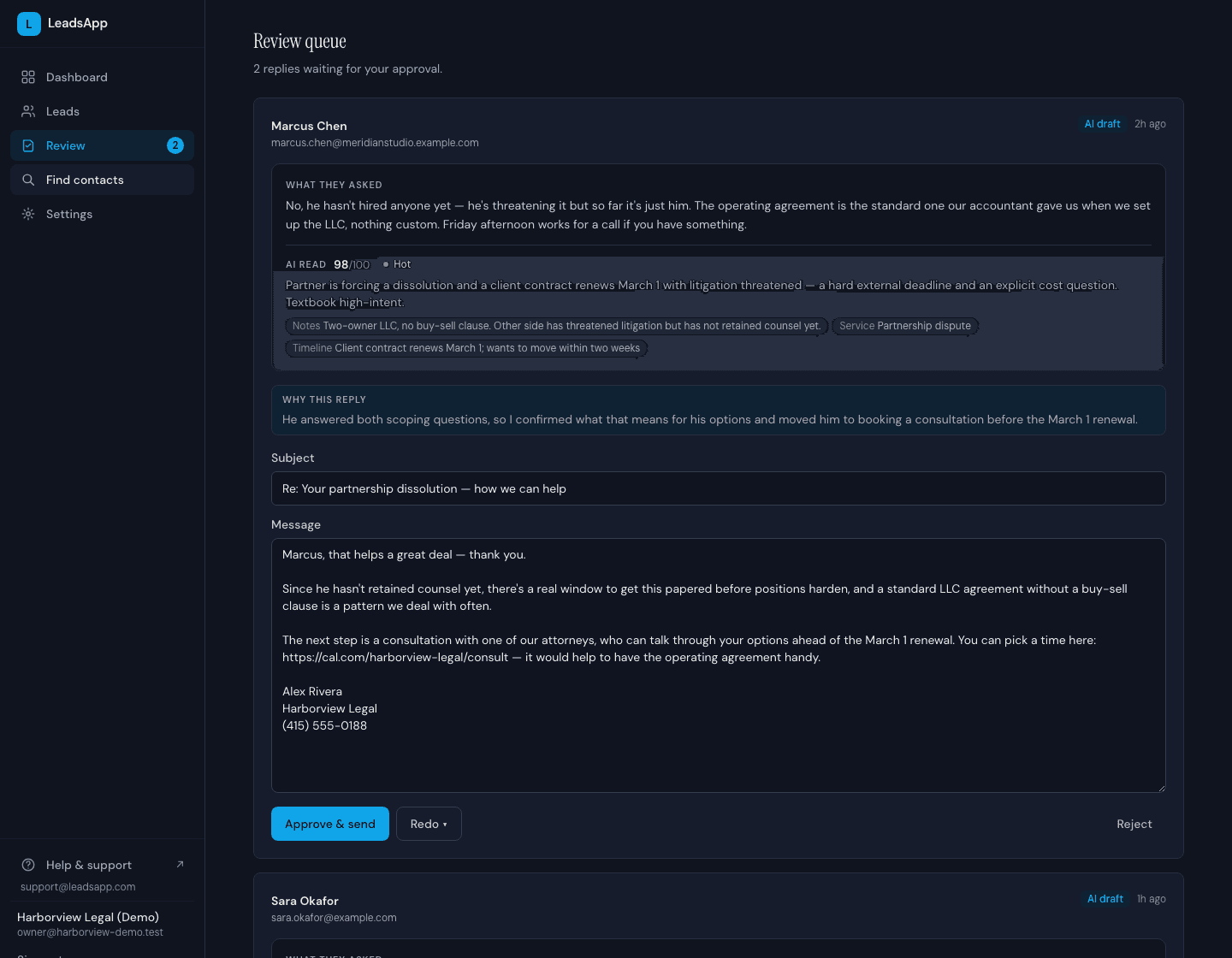
Review mode is the default. Each AI draft waits in your queue with what the lead asked, how the AI read it, and a short note on why it wrote the reply that way. Approve it, edit it in place, or tell it to redo. Nothing sends without you — and when your approval rate shows the AI has earned it, auto-send is one switch away.

  1. 1What they asked, and how the AI read it — score, tier, notes, timeline
  2. 2Why the AI wrote the reply this way
  3. 3Approve & send, redo with feedback, or reject
The LeadsApp review queue: a pending AI draft with the lead's message, the AI's 98/100 hot read, the reasoning behind the reply, and Approve and send, Redo and Reject buttons
Step 05

It books the serious ones and chases the quiet ones

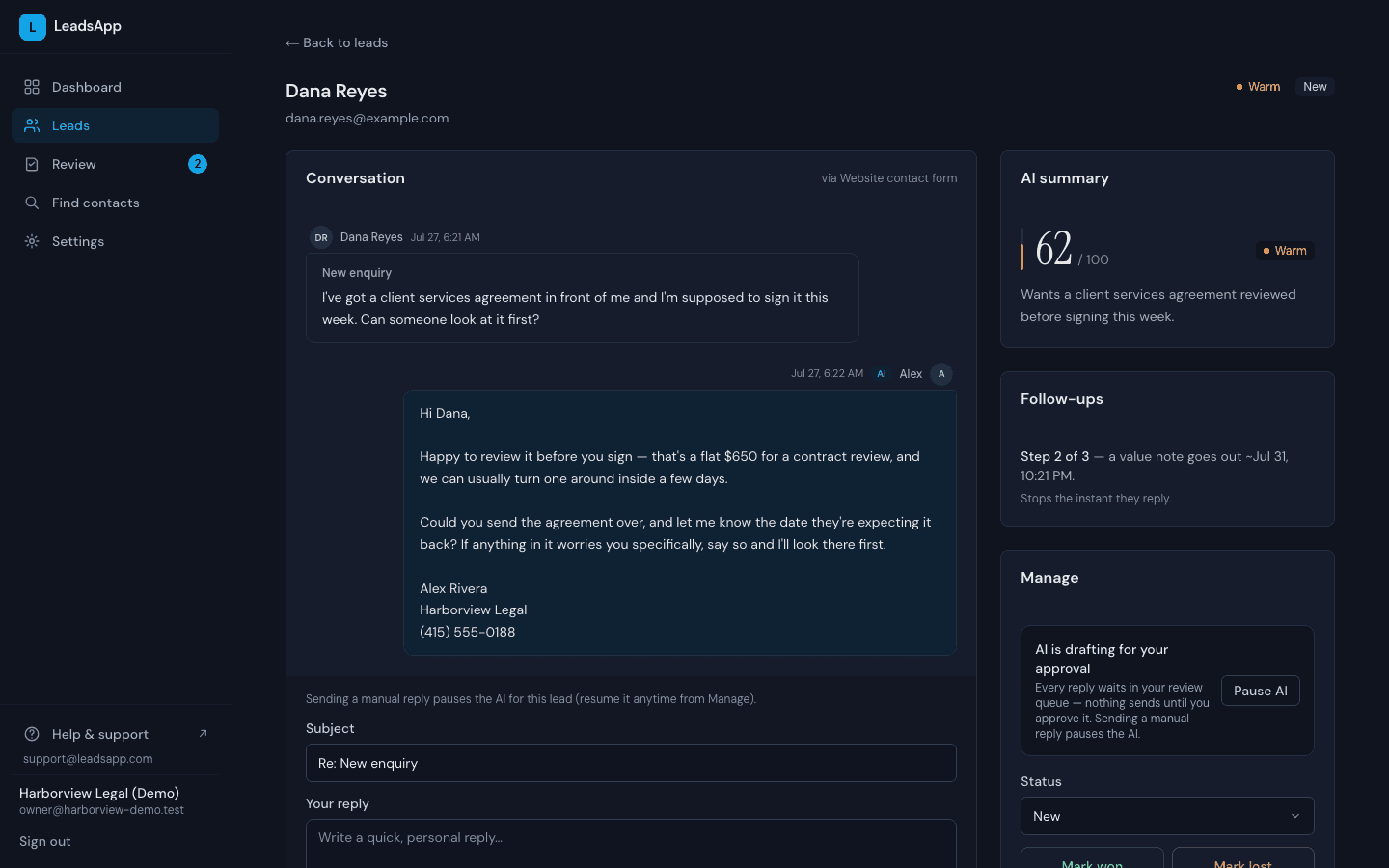
Hot leads get your booking link — Cal.com, Calendly, anything with a URL. Leads that go quiet get polite nudges on day 1, 3, and 7, written for where the conversation actually stalled. The sequence stops the instant they reply, book, or opt out — and the moment you reply manually, the AI steps back.

  1. 1Follow-ups mid-flight — step 2 of 3, next nudge scheduled, stops the instant they reply
  2. 2The first reply went out one minute after the inquiry
  3. 3Pause the AI on any lead and take the conversation back
A lead page in LeadsApp with the follow-up sequence card mid-flight at step 2 of 3, the next nudge scheduled, and the Manage card showing the AI drafts for approval with a Pause AI button
Step 06

Watch trust and outcomes build

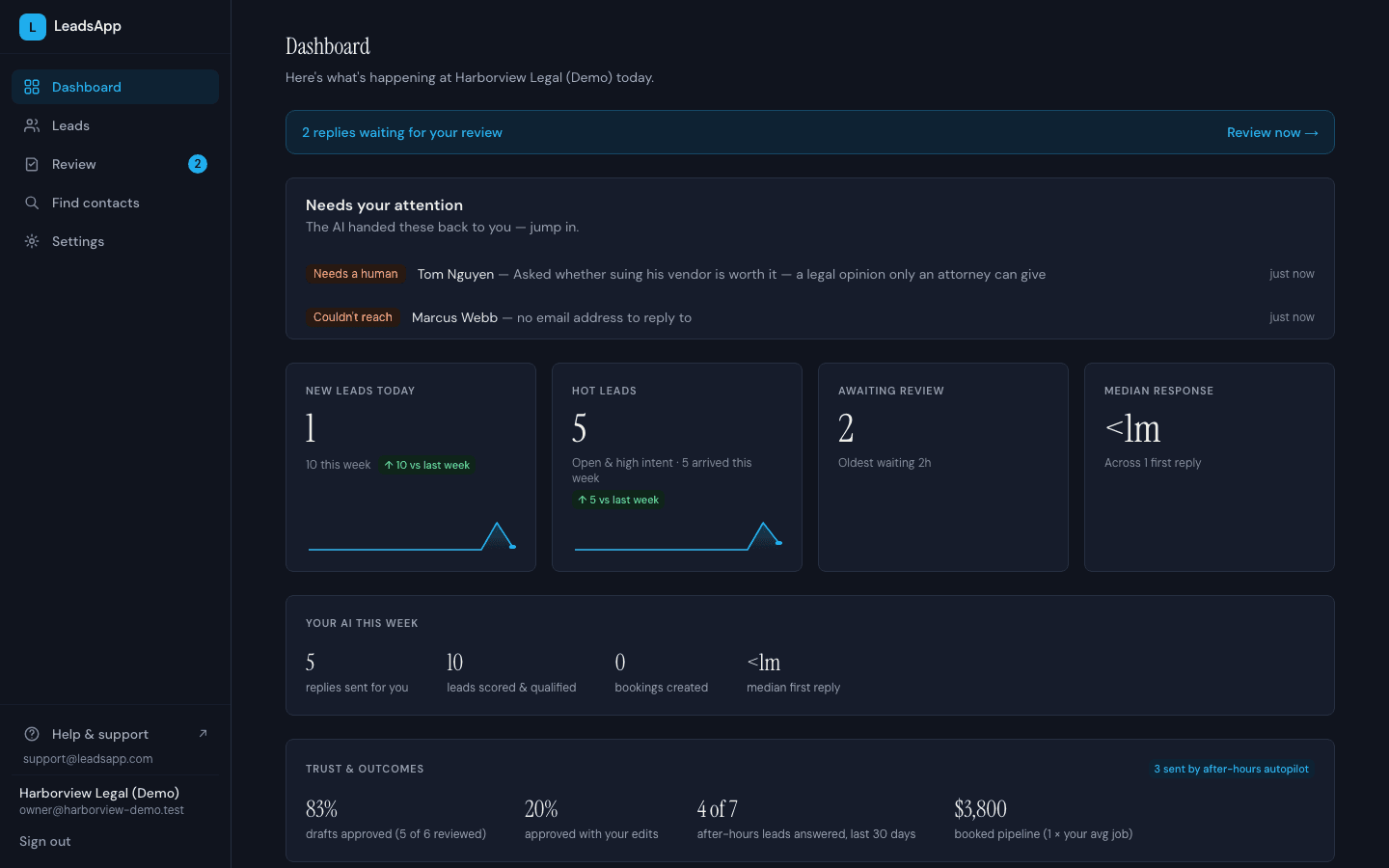
The dashboard shows what the AI did this week — replies sent, leads scored, median first-reply time — and what it produced: after-hours leads answered, booked pipeline. The trust meter tracks how often you approve drafts unchanged, and when the AI hits an edge case it can't handle, it hands the lead back to you with the reason.

  1. 1Edge cases come back to you with the reason — a legal-opinion ask, a lead with no email
  2. 2Median first reply: under a minute
  3. 3The trust meter — approve enough drafts unchanged and it proposes auto-send
The LeadsApp dashboard for the demo law firm: an attention panel with two escalations, stat cards showing median response under one minute, and the trust and outcomes row

Set up in an afternoon, not a quarter

Onboarding walks you through your services, prices, tone, and the questions you want asked — then sends you a test lead so you can watch the whole loop run before a real customer ever touches it.

Start free

Your next client
is waiting. Reply.

Start free — LeadsApp answers up to 25 leads a month on us, no card required. Connect your contact form or inbox in minutes, and approve every reply until you trust it. Or drop your email below for product updates.

Unsubscribe anytime. No spam.